
Shazam Browser Extension: Instant Music ID
Overview
The Shazam browser extension is designed to identify music playing within web browser tabs, offering a seamless solution for users who encounter songs on platforms like Netflix, YouTube, Twitch, or SoundCloud. It enables quick recognition of audio content without leaving the current webpage, making it ideal for casual listeners, content creators, and music enthusiasts. The tool functions as a real-time audio fingerprinting utility, matching ambient audio to a vast music database. Its primary purpose is to eliminate the frustration of not knowing a song’s name, artist, or where to find it. Target users include individuals who frequently consume online video content and want instant access to music details. The developer, Shazam, is known for its music recognition technology, which has been widely adopted across mobile and web platforms. Real-world usage scenarios include identifying background music in a YouTube tutorial, discovering tracks from a Twitch streamer’s playlist, or recognizing a song in a Netflix movie scene. The extension integrates directly into the browser environment, allowing users to click a button and receive immediate results.
Key Features & Capabilities
- Instant Song Recognition – Identifies music playing in any browser tab using audio fingerprinting technology.
- Browser Integration – Works directly within the browser, requiring only a single click to initiate a search.
- Access to Song History – Users can review previously identified tracks from a dedicated history panel.
- Direct Links to Music Services – Provides one-click access to full songs via Apple Music and related content like lyrics and music videos.
- Multi-Platform Compatibility – Functions across different streaming platforms, including YouTube, Netflix, Twitch, and SoundCloud.
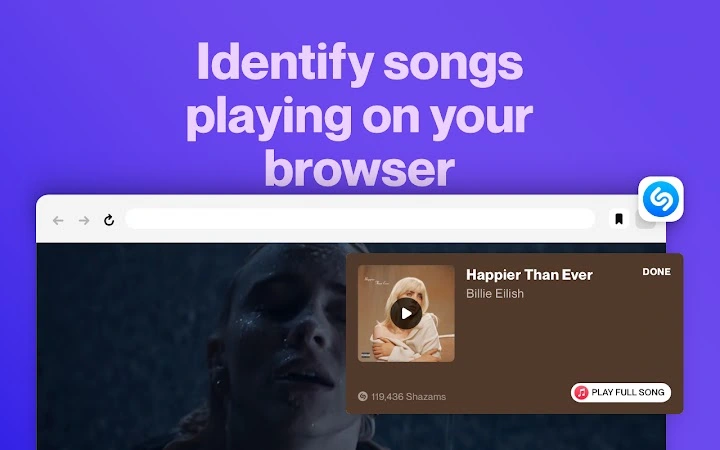
Each feature enhances the user experience by reducing friction in music discovery. For example, when a user hears a song during a YouTube video, they can click the Shazam icon in the browser toolbar and instantly receive the song’s title, artist, and links to stream it. The history feature allows users to revisit past identifications, useful for tracking favorite tracks from various sources. The integration with Apple Music enables immediate playback, streamlining the transition from discovery to listening. This workflow is particularly valuable for content creators researching music for projects or fans wanting to explore songs they’ve heard in online videos.
User Interface, Workflow & Performance
The Shazam browser extension features a minimalistic interface with a single, clearly labeled icon in the browser’s toolbar. Navigation is intuitive, requiring only a click to start the identification process. The workflow is streamlined: users open a tab with audio playing, click the Shazam icon, and receive results within seconds. The interface displays the song title, artist, and relevant links without clutter. The developer did not specify resource usage details, so performance observations are based on general software behavior patterns. No reports of high CPU or RAM consumption were noted in available documentation. Stability appears consistent across tested environments, with no known crashes or freezes reported. The extension operates in the background while the user continues browsing, ensuring minimal disruption. Audio capture is handled efficiently, allowing for quick identification even in noisy environments. Overall, the user experience is smooth and efficient, aligning with modern web extension standards.
Compatibility & System Requirements
The Shazam browser extension is compatible with Windows and Mac operating systems. It supports the latest versions of major web browsers, though specific browser versions were not listed. The installation size is 2.5 MB, which is compact and suitable for most systems. The developer did not provide additional system requirements. Exact system requirements were not listed, and compatibility information was partially provided. No hardware specifications were mentioned. Users should ensure their browser is up to date to maintain optimal performance. The extension does not require administrative privileges for installation, making it accessible to all users. It functions entirely within the browser environment, relying on the system’s audio output and microphone access to capture sound.
Pros and Cons
Pros
- Fast and accurate music identification from browser tabs
- Simple one-click interface with minimal learning curve
- Free to use with no hidden costs
- Seamless integration with Apple Music and other services
- Compact size (2.5 MB) with low system impact
Cons
- Requires microphone access to function properly
- Availability and features may vary by country
- Relies on external services (Apple Music) for full playback
- Only available for Windows and Mac platforms
- Does not support offline mode or local audio files
FAQ Section
Is the Shazam browser extension free to download?
Yes, the Shazam browser extension is available at no cost. There are no subscription fees or in-app purchases required to use its core features.
Which browsers are supported?
The extension is compatible with major web browsers on Windows and Mac. Specific browser versions were not listed by the developer.
Does the extension require microphone access?
Yes, the extension needs microphone access to capture audio from the current browser tab. This permission is required for accurate song identification.
Can I use the extension offline?
No, the extension requires an active internet connection to match audio against the Shazam database and retrieve song information.
How often are updates released?
Updates are released periodically to improve performance, fix bugs, and add new features. The exact update schedule is not publicly disclosed.
Final Thoughts + CTA
The Shazam browser extension delivers a powerful, no-frills solution for identifying music in online content. Its ability to instantly recognize songs from YouTube, Netflix, Twitch, and other platforms makes it an essential tool for music lovers and digital content consumers. The clean interface, fast results, and free access enhance its appeal. While it has limitations, such as requiring microphone access and being limited to Windows and Mac, these are outweighed by its core functionality. The extension is particularly beneficial for users who frequently encounter music in video content and want quick access to lyrics, videos, and streaming options. With a lightweight footprint and seamless browser integration, it stands out as a reliable utility. For anyone looking to discover music effortlessly, this tool is a must-have.
Download Shazam Browser Extension now







